WireUp KNX
The Ultimate Solution for Smart Home System Reliability.
The Ultimate Solution for Smart Home System Reliability.
Feature/ Level Functionalities
Management of Secondary Power Supply
Activation of an external relay to power a backup KNX supply when voltage from the primary source is not detected.
Overcurrent Protection
Automatic disconnection of a branch when the current exceeds the defined safety threshold.
KNX Voltage Monitoring
Real-time measurement of system voltage on the KNX bus.
Support for Additional Node Installation
Connection or disconnection of branches to allow integration of additional KNX nodes without manual rewiring.
Per
Branch Current Monitoring –Continuous measurement of electrical current per Port.
Automatic Node Discovery
Detection of all connected KNX nodes during initial configuration.
Overcurrent Protection
Automatic disconnection of a branch when the current exceeds the defined safety threshold.
Faulty Node Identification
Automatic polling of connected nodes to detect and report non-responsive or malfunctioning devices.
Management of Secondary Power Supply
Activation of an external relay to power a backup KNX supply when voltage from the primary source is not detected.
Overcurrent Protection
Automatic disconnection of a branch when the current exceeds the defined safety threshold.
KNX Voltage Monitoring
Real-time measurement of system voltage on the KNX bus.
Support for Additional Node Installation
Connection or disconnection of branches to allow integration of additional KNX nodes without manual rewiring.
Per
Branch Current Monitoring –Continuous measurement of electrical current per Port.
Automatic Node Discovery
Detection of all connected KNX nodes during initial configuration.
Overcurrent Protection
Automatic disconnection of a branch when the current exceeds the defined safety threshold.
Faulty Node Identification
Automatic polling of connected nodes to detect and report non-responsive or malfunctioning devices.
Management of Secondary Power Supply
Activation of an external relay to power a backup KNX supply when voltage from the primary source is not detected.
Overcurrent Protection
Automatic disconnection of a branch when the current exceeds the defined safety threshold.
KNX Voltage Monitoring
Real-time measurement of system voltage on the KNX bus.
Support for Additional Node Installation
Connection or disconnection of branches to allow integration of additional KNX nodes without manual rewiring.
Per
Branch Current Monitoring –Continuous measurement of electrical current per Port.
Automatic Node Discovery
Detection of all connected KNX nodes during initial configuration.
Overcurrent Protection
Automatic disconnection of a branch when the current exceeds the defined safety threshold.
Faulty Node Identification
Automatic polling of connected nodes to detect and report non-responsive or malfunctioning devices.
Management of Secondary Power Supply
Activation of an external relay to power a backup KNX supply when voltage from the primary source is not detected.
Overcurrent Protection
Automatic disconnection of a branch when the current exceeds the defined safety threshold.
KNX Voltage Monitoring
Real-time measurement of system voltage on the KNX bus.
Support for Additional Node Installation
Connection or disconnection of branches to allow integration of additional KNX nodes without manual rewiring.
Per
Branch Current Monitoring –Continuous measurement of electrical current per Port.
Automatic Node Discovery
Detection of all connected KNX nodes during initial configuration.
Overcurrent Protection
Automatic disconnection of a branch when the current exceeds the defined safety threshold.
Faulty Node Identification
Automatic polling of connected nodes to detect and report non-responsive or malfunctioning devices.
Connection Diagram
Connection Diagram
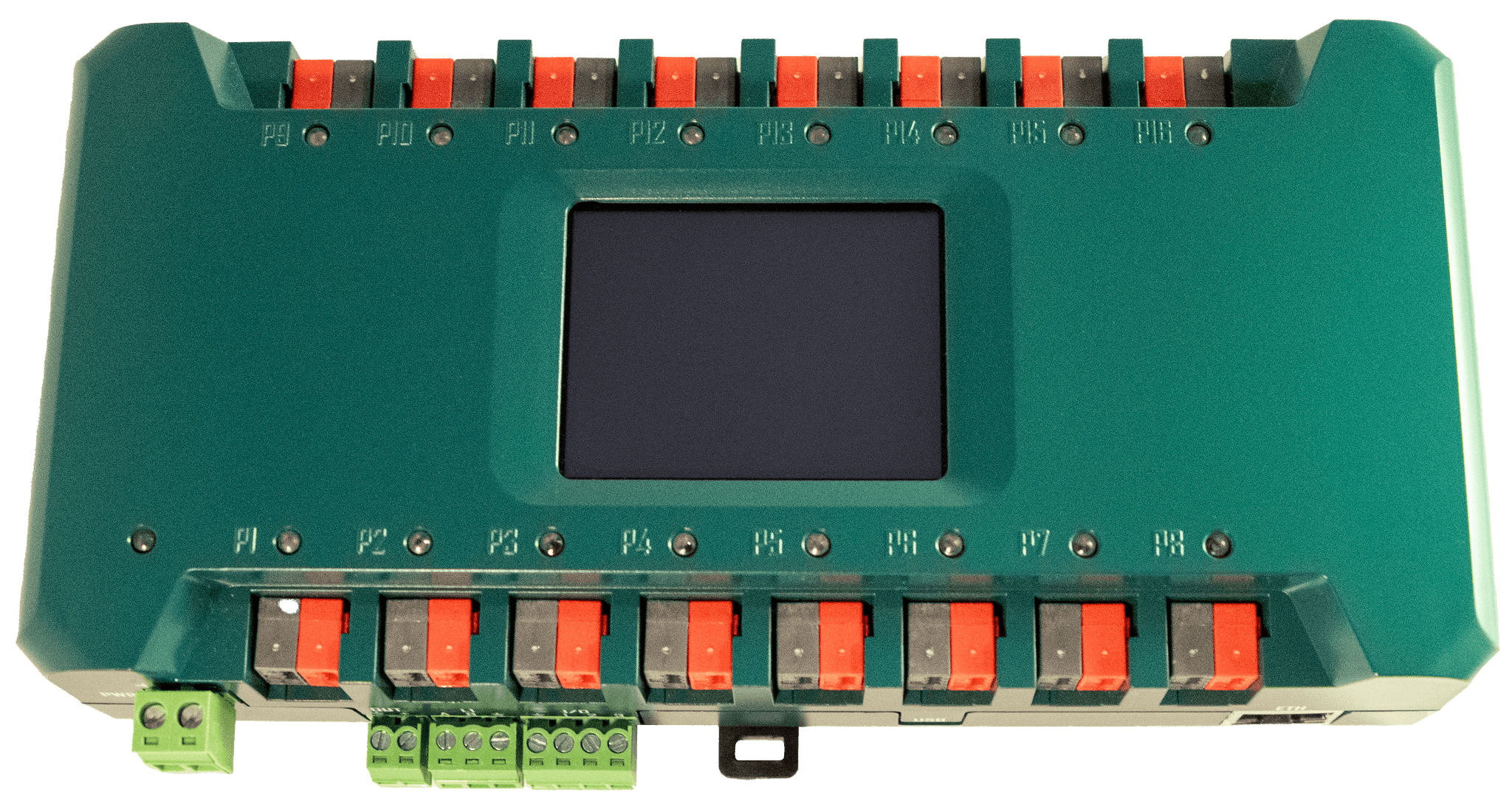
The Power KNX (main power for the KNX BUS) can be connected to any one of the 16 equal-priority ports P1–P16. Do not connect any other KNX devices to the Power KNX line.
The Power KNX Secondary must be connected to any other port among P1–P16. Do not connect any other KNX devices to the Power KNX Secondary line.
The remaining 14 equal-priority ports can be used to connect any KNX lines.
If the Power KNX is not detected or becomes unavailable, the WireUp KNX will output the input voltage (Vin) on the 2-pin OUT connector to activate the Power KNX Secondary.
The device will periodically scan ports P1–P16 to check for the presence of voltage on the KNX BUS.
Cloud-Based Capabilities
/01
Controlled Reboot Permissions
Ability to enable or disable remote power reboot per branch.
/01
Controlled Reboot Permissions
Ability to enable or disable remote power reboot per branch.
/01
Controlled Reboot Permissions
Ability to enable or disable remote power reboot per branch.
/01
Controlled Reboot Permissions
Ability to enable or disable remote power reboot per branch.
/02
Issue Resolution Tracking
Visual indication of issues that have been resolved.
/02
Issue Resolution Tracking
Visual indication of issues that have been resolved.
/02
Issue Resolution Tracking
Visual indication of issues that have been resolved.
/02
Issue Resolution Tracking
Visual indication of issues that have been resolved.
/03
Email Alerts
Automatic notifications sent to a predefined email address upon detection of any fault or abnormal condition.
/03
Email Alerts
Automatic notifications sent to a predefined email address upon detection of any fault or abnormal condition.
/03
Email Alerts
Automatic notifications sent to a predefined email address upon detection of any fault or abnormal condition.
/03
Email Alerts
Automatic notifications sent to a predefined email address upon detection of any fault or abnormal condition.
/04
Remote Monitoring and Control
Independent supervision and control of each output branch.
/04
Remote Monitoring and Control
Independent supervision and control of each output branch.
/04
Remote Monitoring and Control
Independent supervision and control of each output branch.
/04
Remote Monitoring and Control
Independent supervision and control of each output branch.
/05
Supervision of Node Connection
Cloud-based control over connecting or disconnecting additional KNX nodes via branch-level switching.
/05
Supervision of Node Connection
Cloud-based control over connecting or disconnecting additional KNX nodes via branch-level switching.
/05
Supervision of Node Connection
Cloud-based control over connecting or disconnecting additional KNX nodes via branch-level switching.
/05
Supervision of Node Connection
Cloud-based control over connecting or disconnecting additional KNX nodes via branch-level switching.
Technical Specifications
KNX Bus Connectivity + Power
Dimensions
Box Contents
16 Equal Ports
ModBus
RTU
KNX
36VDC (Max)
1mA
WiFi
2.4 GHz
Power
Vin 12 - 24 VDC
1.5W
Ethernet
KNX Bus Connectivity + Power
Dimensions
Box Contents
16 Equal Ports
ModBus
RTU
KNX
36VDC (Max)
1mA
WiFi
2.4 GHz
Power
Vin 12 - 24 VDC
1.5W
Ethernet
KNX Bus Connectivity + Power
Dimensions
Box Contents
16 Equal Ports
ModBus
RTU
KNX
36VDC (Max)
1mA
WiFi
2.4 GHz
Power
Vin 12 - 24 VDC
1.5W
Ethernet
KNX Bus Connectivity + Power
Dimensions
Box Contents
16 Equal Ports
ModBus
RTU
KNX
36VDC (Max)
1mA
WiFi
2.4 GHz
Power
Vin 12 - 24 VDC
1.5W
Ethernet
FAQ
Can all 16 ports (P1–P16) be used for segmenting the KNX BUS?
Can all 16 ports (P1–P16) be used for segmenting the KNX BUS?
Can all 16 ports (P1–P16) be used for segmenting the KNX BUS?
Can all 16 ports (P1–P16) be used for segmenting the KNX BUS?
Are there dedicated ports on the KNX BUS for connecting the main and secondary power supplies?
Are there dedicated ports on the KNX BUS for connecting the main and secondary power supplies?
Are there dedicated ports on the KNX BUS for connecting the main and secondary power supplies?
Are there dedicated ports on the KNX BUS for connecting the main and secondary power supplies?
How should WireUp KNX be installed in multi-floor buildings where a KNX power supply is required on each floor, and the entire system must operate as a unified installation?
How should WireUp KNX be installed in multi-floor buildings where a KNX power supply is required on each floor, and the entire system must operate as a unified installation?
How should WireUp KNX be installed in multi-floor buildings where a KNX power supply is required on each floor, and the entire system must operate as a unified installation?
How should WireUp KNX be installed in multi-floor buildings where a KNX power supply is required on each floor, and the entire system must operate as a unified installation?
Discover More About Our Innovative Solution
Get a taste of our cutting‑edge approach to smart home reliability. Learn how our hardware and integrated platform work together to keep systems running seamlessly. For full details and technical insights, explore our dedicated Product Page.

Discover More About Our Innovative Solution
Get a taste of our cutting‑edge approach to smart home reliability. Learn how our hardware and integrated platform work together to keep systems running seamlessly. For full details and technical insights, explore our dedicated Product Page.
Discover More About Our Innovative Solution
Get a taste of our cutting‑edge approach to smart home reliability. Learn how our hardware and integrated platform work together to keep systems running seamlessly. For full details and technical insights, explore our dedicated Product Page.
Discover More About Our Innovative Solution
Get a taste of our cutting‑edge approach to smart home reliability. Learn how our hardware and integrated platform work together to keep systems running seamlessly. For full details and technical insights, explore our dedicated Product Page.